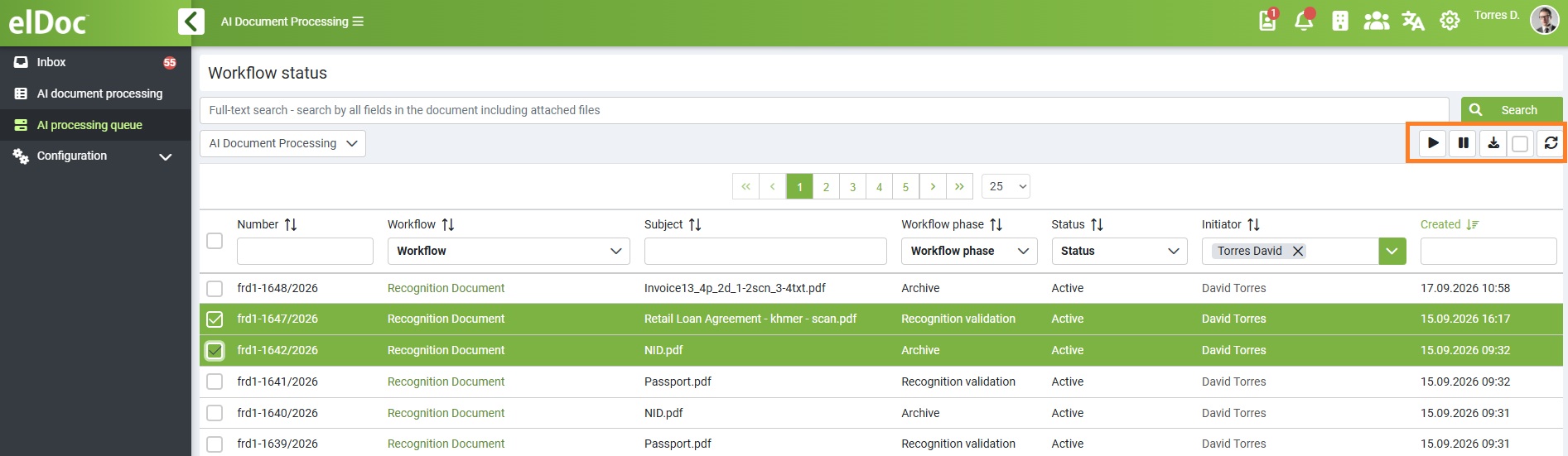
Within the AI Processing Queue, the users can manage document processing and export results. Select one or multiple documents and choose from the available actions:
- Resume: Resume processing of suspended or paused documents.
- Suspend: Temporarily pause processing of selected documents.
- Export to CSV: Select all documents or specific documents and export the extracted data to a CSV file for further processing or analysis.
- Export with Attachments: Export processing results together with the associated source documents.
- Refresh: Refresh the queue to display the latest processing status and results.
- JSON / API Integration: Extracted document data can also be retrieved in JSON format through the elDoc API for integration with third-party systems and automated workflows. For configuration and available endpoints, please refer to the elDoc API Documentation: API
When the Admin view is selected, additional document administration actions become available:
- Bulk Edit: Edit selected documents in a single operation.
- Block: Block selected documents from further processing or actions.
- Unblock: Unblock previously blocked documents.
- Delete: Permanently remove selected documents from the system.
