Custom AI Extraction - Basic Settings
In most document-processing use cases, you do not need to capture all information from a document. Instead, each document type may require a specific set of fields - for example, invoice number, contract date, customer name, total amount, expiration date, or other business-specific information. With Custom AI Extraction, you can simply tell AI which fields you want to capture by configuring extraction rules for each document type.
To configure Custom AI Extraction, you must have an Administrator role in elDoc.
Navigate to: Configuration → Recognition Rules. From Recognition Rules, you can define the document type and configure the specific fields that AI should identify and extract during document processing.
This allows you to create different extraction configurations for different document types and capture only the information required for your business process.

IMPORTANT
Quick Configuration for Custom AI Extraction
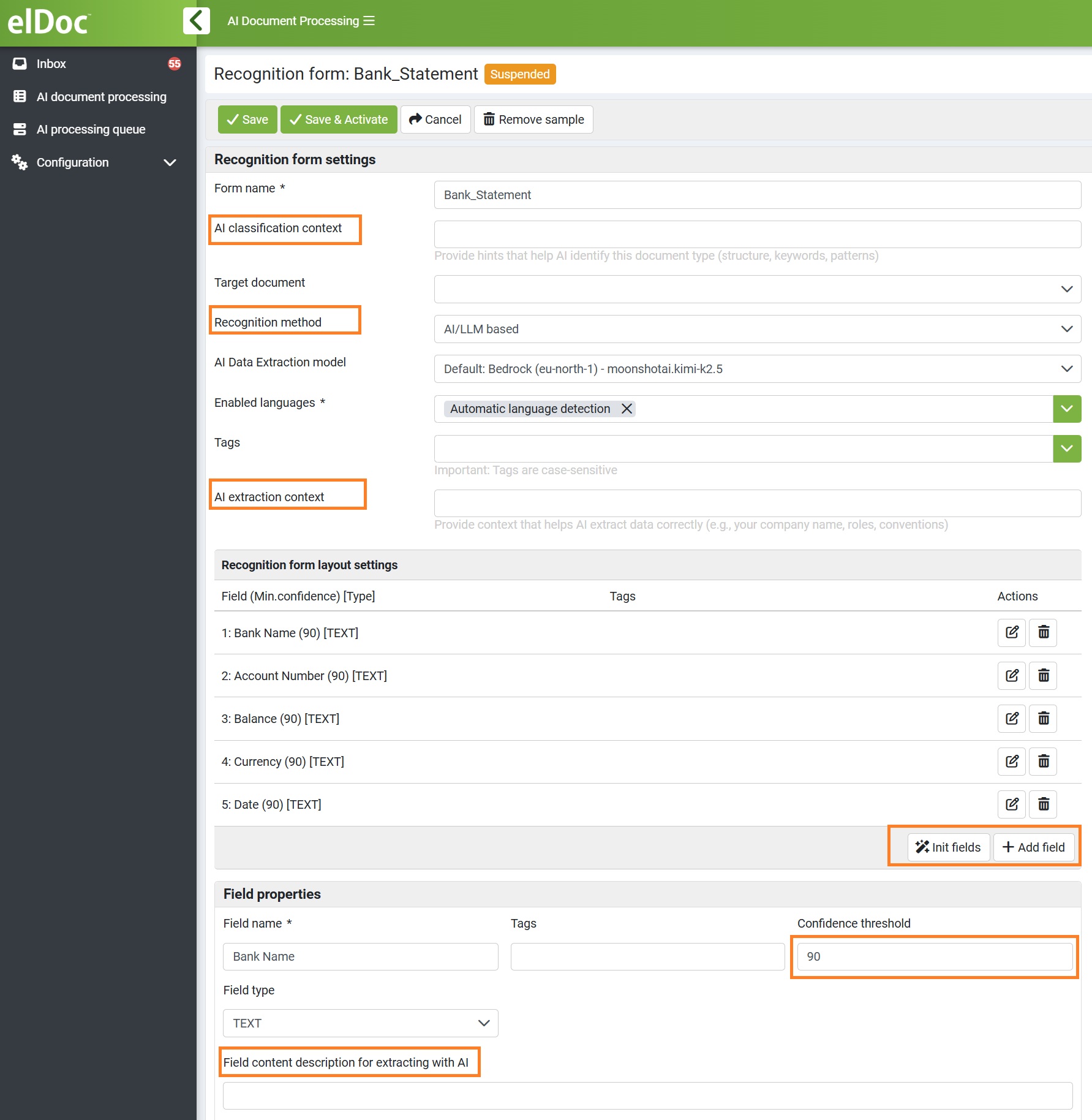
To quickly configure Custom AI Extraction, focus on the following key settings:
AI Classification Context: Recommended when AI needs additional guidance to correctly identify the document type. Describe what makes this document unique, including its purpose, structure, or other distinguishing characteristics.
Recognition Method: Select AI / LLM-Based to use Generative AI for document understanding and field extraction.
AI Extraction Context: Recommended to improve extraction accuracy. Provide document-level context that helps AI understand the document, terminology, roles, conventions, or business-specific information.
Initialize Fields / Add Field: Define the specific data you want AI to capture. Use Initialize Fields to let AI propose relevant fields automatically, or Add Field to define them manually.
Field Content Description for Extracting with AI: Recommended for more accurate extraction. Tell AI what the field represents and provide specific instructions on how to identify or interpret its value.
Confidence Threshold: Define the minimum acceptable confidence level for each field. Results below the threshold can be routed for Human-in-the-Loop validation.
Tip: For a quick setup, you do not need to create complex rules - advanced settings. Define the fields you need, provide AI with additional context where helpful, set the confidence thresholds, and let the LLM interpret and extract the required information from the document.
For detailed instructions on how to configure Custom AI Extraction and Recognition Rules, please refer to the step-by-step configuration guide: Custom AI Extraction and Recognition Rules